Schedule Telegram Channel Posts from TimeToPost
Yes. Telegram has native scheduling for channels: a channel admin with the Post Messages right can hold (or right-click) the send button in the Telegram app, choose Schedule Message, and pick a date and time. For recurring calendars across several networks, or posts that should leave from a bot instead of a person, TimeToPost can send scheduled text and supported media to a Telegram channel using your own bot.
Last reviewed: October 18, 2026.
Native Telegram scheduling for channels
Telegram's apps let you schedule a message in any chat: hold the Send button and choose Schedule Message (on desktop, right-click the send button). In a channel, only admins can post, so only admins can schedule. Scheduled posts wait in the channel's scheduled list, where you can edit, reschedule or send them immediately.
What native scheduling needs:
- You are an admin of the channel with the Post Messages right turned on.
- You schedule from a Telegram app, not from a bot. The Bot API's
sendMessagemethod has no scheduling parameter, which is why a bot cannot use this feature and something else has to hold the post until it is due.
Native scheduling is a good fit for one channel you post to by hand. It does not give you a shared calendar, cross-network planning, or posting from outside the Telegram app. That is where the bot route below comes in.
Scheduling with TimeToPost and your own bot
TimeToPost can send scheduled posts to a Telegram channel using your own bot. This means you create and manage the bot in Telegram, then connect it in TimeToPost with the details required by the platform.
Plan your channel posts alongside other connected accounts in one calendar. Each post targets the channel you selected; connecting a bot does not give TimeToPost access to your personal Telegram messages.
What you need first
Before connecting, make sure you have:
- A Telegram bot token from BotFather
- The channel ID for the destination channel, either
@channelnameor a numeric ID - Your bot added to the channel as an admin with permission to post messages (the Post Messages right, which the Bot API calls
can_post_messages)
TimeToPost stores tokens encrypted. Removing a connection from TimeToPost removes it from the app, but it does not revoke the token at Telegram. If you want to fully disable access, revoke the bot token in Telegram as well.
If connection fails, verify the bot is an administrator of the intended channel and has Post Messages enabled. For a private channel, use its numeric ID. A group or personal chat is not supported by this channel connector.
Supported post formats
Telegram channel posts can include:
- Plain text up to 4,096 characters
- Images with captions up to 1,024 characters
- Video with captions up to 1,024 characters
- Albums with up to 10 items
Conservative product limits currently used by TimeToPost:
- JPEG/PNG images up to 5 MB each
- MP4 video up to 20 MB each
Threads are not supported for this integration.
These are TimeToPost connection limits. They do not imply support for every feature available in Telegram itself. Check the post preview and character counter before scheduling.
Connect your Telegram channel
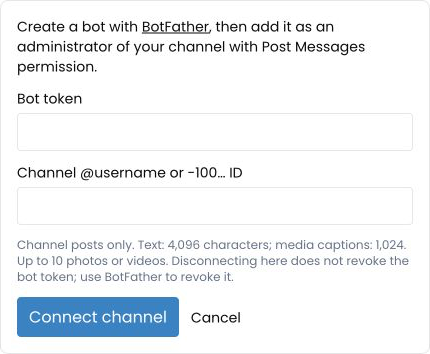
- Open Settings → Integrations
- Choose Connect beside Telegram
- Enter your bot token from BotFather
- Enter the channel ID
- Confirm the bot has channel admin access with Post Messages permission
- Choose Connect channel
After saving, open the dashboard, create a post and select the exact connected Telegram channel. Add your text and any supported media, choose a future date and time, then schedule. Check the calendar entry to confirm the destination and time. If you manage multiple workspaces, switch to the intended workspace before connecting or composing.
Scheduling and delivery status
Scheduled messages become due at the selected time. Delivery can take a short time while the scheduler processes the queue. TimeToPost records delivery state, but external platform responses can still leave a result uncertain. If a send appears uncertain, check the destination channel before trying again.
TimeToPost does not blindly retry uncertain sends. That avoids duplicate posts when a message may already have been published.
You can review upcoming and past scheduled items in Calendar.
Disconnecting or revoking access
To disconnect the integration from TimeToPost, remove Telegram from Settings → Integrations.
To fully revoke access:
- Remove the bot from the channel if needed
- Revoke or rotate the bot token in Telegram
- Reconnect with a fresh token only if you want to resume posting
FAQ
Can you schedule posts in a Telegram channel without any extra tool?
Yes. As a channel admin with the Post Messages right, hold or right-click the send button in the Telegram app and choose Schedule Message. Bots cannot use this, because the Bot API has no scheduling parameter.
Do I need to be an admin to schedule a Telegram channel post?
Yes. Only channel admins can post, so only admins can schedule natively. For TimeToPost, your bot must be an admin with Post Messages enabled.
Can I use my personal Telegram account?
No. This integration uses a bot token for channel posting.
Can I post in threads?
No. Threads are not supported.
What happens if a post result is uncertain?
Check the channel first, then create a fresh attempt only if needed.
Does removing the integration revoke the Telegram token?
No. Removal from TimeToPost does not revoke the provider token.