From Views to Paying Customers: How to Track Link Clicks, Signups and Sales Per Post
A post with 40,000 views and no customers is not a win. A post with 900 views that sent four buyers is. Without tracking you cannot tell them apart, so you make more of the first kind because the number looked bigger.
To track link clicks from social media through to sales, give each post or campaign its own tagged link, count the clicks on it, then follow the visitor through your site's signup and payment events. You end with a funnel: views, taps, landed, signups, paid. The step with the biggest drop is the one to fix.
The funnel, step by step
Pick a week and fill in this table for your top posts:
| Step | What it counts | Where the number comes from | |---|---|---| | Views | Times the post was played or shown | The platform | | Taps | Clicks on the link | Short link counts | | Landed | Page loaded on your site | Site analytics | | Signups | Accounts created | Your app or checkout | | Paid | First payment | Your payment provider |
Read it top to bottom and find the step that loses the most:
- Views to taps is low: the call to action is weak, or people do not know there is a link. Say where it is.
- Taps to landed is low: the page is slow, or the link breaks inside an in-app browser.
- Landed to signups is low: the page does not match what the post promised.
- Signups to paid is low: the problem is the product or the trial, not the post.
If a step has no data, leave it out. Do not write zero. A zero says nobody did it, which you cannot support.
Tag the links
A link has two jobs: send the visitor to the right page and say where they came from. The usual way is UTM tags: utm_source for the platform, utm_medium for social, utm_campaign for the post or push. Your analytics reads them on arrival. The campaign link builder assembles them so you do not mistype one.
Where the platform allows a clickable link (YouTube long-form descriptions, LinkedIn, X, Instagram Story link stickers), build one per post. On TikTok, Instagram Reels and YouTube Shorts, where only the bio link is clickable, change the bio link per campaign and note the dates.
Long tagged links look ugly and break easily. A short link that redirects to the tagged one is cleaner, and it lets you count taps before the visitor reaches your site. Keep the names consistent: "tiktok", "TikTok" and "tik-tok" show up as three sources.
Count taps and landings separately
Taps are clicks on the link. Landed is people whose page actually loaded. The gap between them is real: people tap and bounce, in-app browsers fail, and link preview bots can also inflate taps. If taps look healthy and landed is low, look at page speed and the link, not the post.
Record signups and payments with the source
Your site has to record the events: signup, trial start, payment. Save the source tag on the user, so you can say "this signup came from the Tuesday clip". If you can only separate by platform and not by post, that is still better than nothing.
Habits that keep the data clean
- Write down your naming for sources and campaigns once.
- Tag every link you post, including the one in your bio.
- Once a week, click one tagged link end to end: sign up with a test account, confirm it appears, and tag it as a test account so it stays out of your numbers.
- Review the funnel weekly. Single days are noisy.
Seeing it on one screen in Reach
TimeToPost's Reach page draws this funnel as a strip above its table: Views, Taps, Landed, Signups, Paid. It marks the biggest drop. Reach is on the Pro and Growth plans.
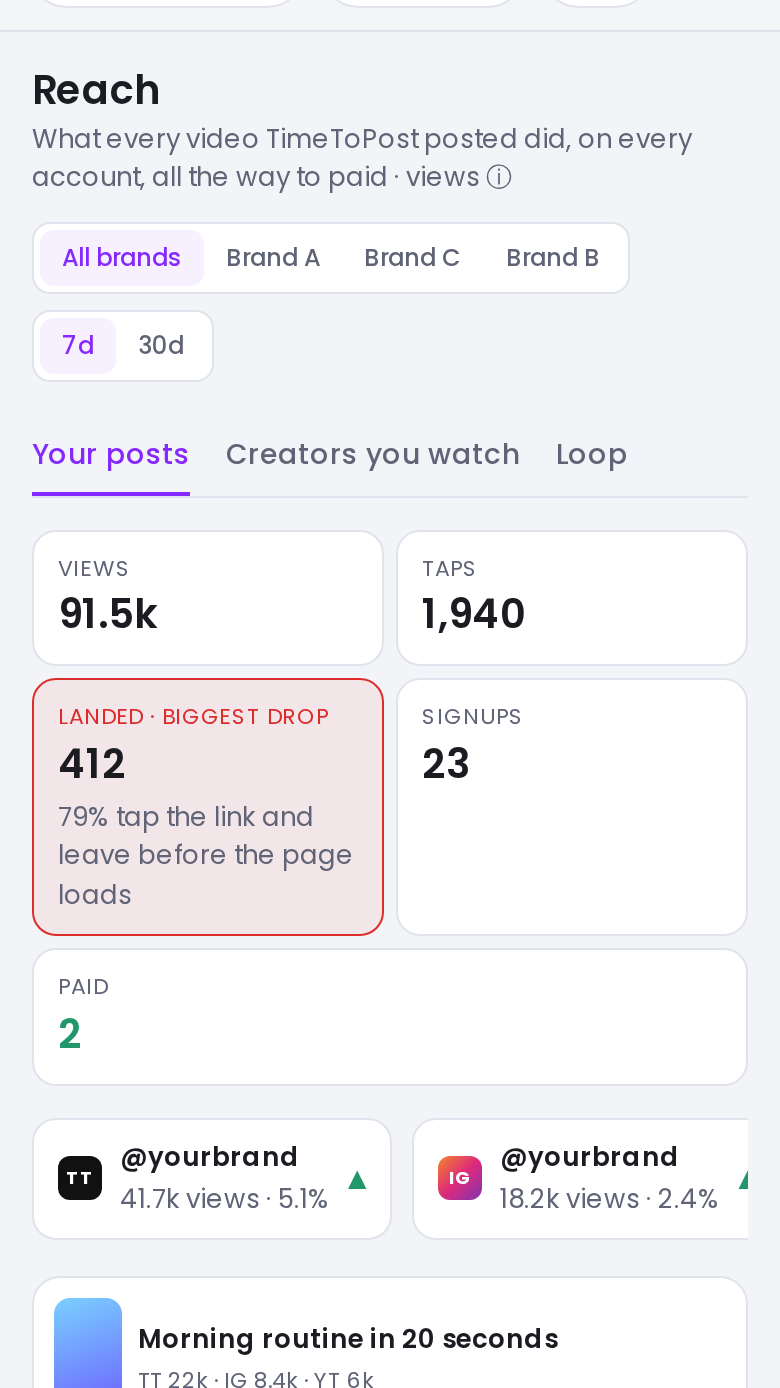
Screenshot with sample data.
Taps are counted with TimeToPost short links. Landed, Signups and Paid appear only when your workspace's links carry tracking. A step with no data is left out of the strip, never shown as zero.
Because the funnel starts at views, you can see whether you lose people before the tap, between tap and page, or after they land.
In the table, each post carries its link clicks. Each post's detail page shows engagement by account, likes, comments, shares, saves, link clicks and a list of recent clicks. That is the "which post sent them" view. The Reach feature page has the rest.
Where this fits
Link click-through is one of the signals covered in the analytics you are ignoring. To pick which posts deserve a second run, use the method for finding your best posts.
FAQ
How do I track link clicks from social media?
Use a separate tagged link for each post or campaign, ideally through a short link that counts taps. Then read the tags in your site analytics to follow visitors to signup and payment.
What are UTM parameters?
Tags added to the end of a URL, usually utm_source, utm_medium and utm_campaign, that tell your analytics where a visitor came from.
Why do taps not equal landings?
Some people leave before the page loads, in-app browsers sometimes fail, and link preview bots can add clicks. The gap points to your page or link, not your post.
Does Reach show sales per post?
It shows signups and paid steps only when the workspace's links carry tracking. Steps without data are left out, not shown as zero.
I build TimeToPost.