When to Repost Your Best Video, and When to Retire One
Short answer: repost a video when it is more than 48 hours old, has at least 500 views, and its engagement rate is 1.2 times the average of its own account's last 30 days, or higher. Retire it, meaning do not repost it, when its engagement is 0.6 times that average or lower and it brought no signups. Between the two lines, keep it and watch.
Those are the thresholds Reach uses. You can apply them by hand with a spreadsheet, and this article shows how and why each number is there.
Want to put this into practice? Schedule your first post free with TimeToPost and let it post at your best time.
Why have a rule
Without one, reposting is a mood. You repost what you liked, or what just got attention, or you never repost because it feels lazy. A rule makes it a weekly check of a few minutes. It also guards against two opposite mistakes:
- Reposting a lucky spike. A video with 90 views and two shares looks great as a ratio. It is not evidence.
- Reposting a dud again and again because you believe in the idea while the numbers disagree.
The three tests for a repost
Age: more than 48 hours. Views keep arriving after day one. Judge at hour six and you compare a finished post with an unfinished one.
Size: at least 500 views. Under roughly 500, one extra share moves the ratio a lot. If your accounts are very small, lower the floor, then keep it fixed for a few weeks so comparisons stay fair.
Strength: 1.2 times your own average. Take the account's average engagement rate over the last 30 days: likes, comments, shares and saves divided by views. If the post is at 1.2 times that or higher, it beat the account's normal by a fifth. That margin is small enough to catch real winners and large enough to skip noise. Compare against the same account only. The post has to beat the audience that saw it.
The test for retiring
A post is a retire candidate when both are true:
- Its engagement rate is 0.6 times its account average or lower.
- It brought no signups, or no sales, or whatever your goal is.
The second condition matters. A post with weak engagement that sent paying customers may be doing its job. Check clicks and signups first. Tracking link clicks, signups and sales per post shows how. Retire means do not post it again in the same form. You can still reuse the idea with a new hook.
Worked example, with invented numbers
| Post | Age | Views | Post engagement | Account average | Ratio | Verdict | |---|---|---|---|---|---|---| | Studio tour | 9 days | 4,100 | 6.0% | 4.0% | 1.50 | Repost | | Weekly tip | 5 days | 700 | 4.4% | 4.0% | 1.10 | Keep, watch | | Product demo | 12 days | 1,900 | 2.2% | 4.0% | 0.55 | Retire if no signups | | New clip | 1 day | 280 | 7.5% | 4.0% | n/a | Still counting |
The last row is the useful one. The new clip looks like the best of the four, but it is under the age line and under the floor. The rule says wait.
How to repost it
Once a post passes, give it space so the same follower is not shown it twice in a row. A gap of a few weeks is a sensible default. Change the first line or the opening frame. Exact re-uploads can get less distribution.
Evergreen content recycling covers pace and limits for requeueing. That post uses a flat 5% bar. The 1.2x ratio adapts to each account. The wider idea of reusing work is in the repost strategy.
Reposting versus boosting
A post that beat its own average is also a better bet for paid promotion than a random one: you pay to amplify something that has already proved itself. Organic reposting costs only a queue slot, so most people start there.
The same rule on the Reach page
Reach runs these tests on the posts TimeToPost published, so you skip the ratios. It sits in the Pro and Growth plans.
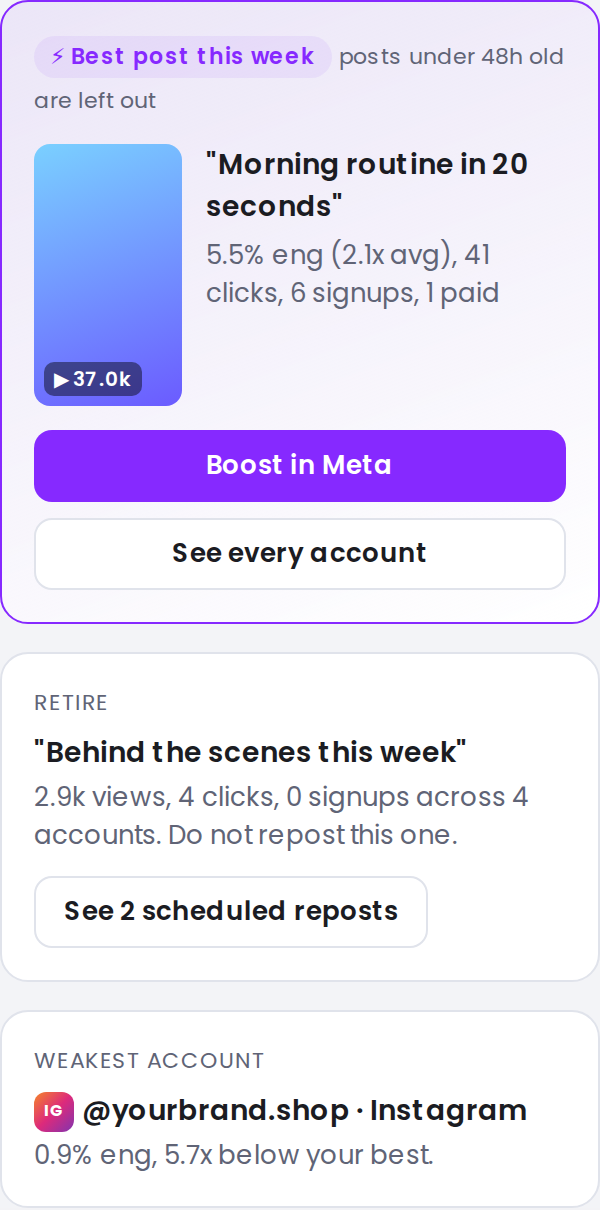
Screenshot with sample data.
- Best post this week: older than 48 hours, 500 or more views, engagement at 1.2 times its own account's 30 day average or higher. For Instagram posts it offers a "Boost in Meta" link. For TikTok posts it links to TikTok's Spark Ads help. TimeToPost does not run ads itself. The link opens Meta's or TikTok's own tools.
- Retire: a post at 0.6 times its account average or lower with no signups. Do not repost it.
- Weakest account: shown when you have at least two accounts and three or more older posts per account.
- Posts under 48 hours are tagged "counting", grey and never picked.
Signups appear only when your workspace's links carry tracking. The Reach feature page has the rest.
FAQ
How soon can I repost a video that did well?
Judge it after 48 hours, then leave a gap so the same followers are not shown it twice in a row. A few weeks is a sensible default.
What is a good engagement rate to repost at?
There is no fixed number. Compare the post with its own account's last 30 day average. Beating it by 1.2 times or more is the bar Reach uses.
Should I delete a post that did badly?
Not necessarily. Retire means you do not repost it. Deleting is a separate choice, and a post that brought signups should stay.
Does Reach decide for me?
It suggests. It marks a best post, a post to retire and a weak account using fixed rules. You still choose what goes in the queue.
I build TimeToPost.